LogonTime

LogonTime

Instantly analyze event logs. An ultra-fast command-line tool to automatically calculate PC usage duration.

Download on GitHub

*No installation required. Runs as a standalone app.

No additional runtimes needed

LogonTime is built with .NET 10 Native AOT technology.

It requires no .NET runtime installation and does not write to the Windows Registry. Operating as a single standalone executable file (.exe), it launches ultra-fast with minimal system footprint.

Product Overview

"Turn hidden logs into reliable evidence."

LogonTime is an ultra-fast, lightweight command-line tool that analyzes Windows "System" event logs to extract user logon/logoff times and automatically calculate total active duration.

It can be efficiently utilized to assist with your daily timecard data entry or serve as solid evidence (audit trails) of your working hours during remote work.

Key Features

  • Custom Time Period: Specify how many days of logs to retrieve via arguments (default: 30 days).
  • Multi-format Output: Supports --csv and --json outputs for seamless script and tool integration alongside standard console output.
  • Multilingual Support (i18n): Automatically detects OS language settings to display messages optimized for English or Japanese environments.
  • Smart Behavior: Waits for user input when launched via double-click to prevent the window from closing immediately, while exiting instantly when run from a terminal.

Screenshots

LogonTime Console Output

Execution Result (Standard Output)

Logon/logoff actions and calculated durations are color-coded for easy viewing.

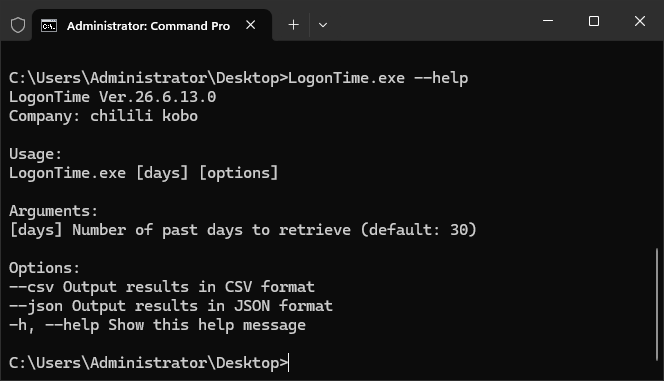
LogonTime Help Screen

Help Screen (--help)

Displays a list of available arguments and options, including CSV and JSON export preferences right in your terminal.

How to Use

01

Simple Run

Just double-click the executable (LogonTime.exe) to display logs from the past 30 days.

02

Specify Period

Pass the number of days as an argument from the terminal, such as LogonTime.exe 14, to change the tracking period.

03

Export Data

Add the --csv or --json options to easily integrate data with external tools or automated scripts.

Changelog

  • v26.6.13.0 Jun 13, 2026
    Migrated to .NET 10.0 / Native AOT, implemented CSV/JSON options, and added multilingual (EN/JA) support.
  • v24.3.5.0 Mar 5, 2024
    Added support for English OS environments.
  • v23.10.31.1 Oct 31, 2023
    Fixed a bug that caused an error when the username was unknown.
  • v22.6.12.0 Jun 12, 2022
    Slightly optimized for a lighter footprint.
  • v22.5.27.1 May 27, 2022
    Initial release.

Download

Standard Edition

FREE

Get it on GitHub

Freeware (Personal & Commercial)

Redistribution Prohibited

Commercial Use Allowed

System Requirements

OSWindows 10 (1607+) / 11
ServerWindows Server 2012+
Arch64-bit (x64)
RuntimeNone (.NET 10 Native AOT)
FormatSingle Executable