Ohnuki-san Hub

Ohnuki-san Hub

All-in-one Windows IT asset console for portable scanner deployment & fleet CSV analytics

Windows 11 / 10 / Server | Native AOT (Zero Runtime) | 100% Portable | Hub Is Free & Unlimited

*Analytics, CSV export & Free scanner export are 100% free & unlimited (includes 24h one-shot Pro Trial)

Product Overview

"Free (formerly Lite), Pro (formerly Plus), and Dashboard—unified into one."

Ohnuki-san Hub combines portable OhnukiSan.exe scanner creation with multi-PC HTML report analytics and Excel CSV export. Formerly three separate tools—Lite (now Free), Plus (now Pro), and Dashboard—everything now lives in one console.

Legacy Lite / Plus Files Are Not Supported Files and reports generated by legacy Ohnuki-san Lite or Plus cannot be loaded in Ohnuki-san Hub. Please use HTML reports created by the latest OhnukiSan.exe (Free / Pro) exported from Hub.

Portable Scanner Export

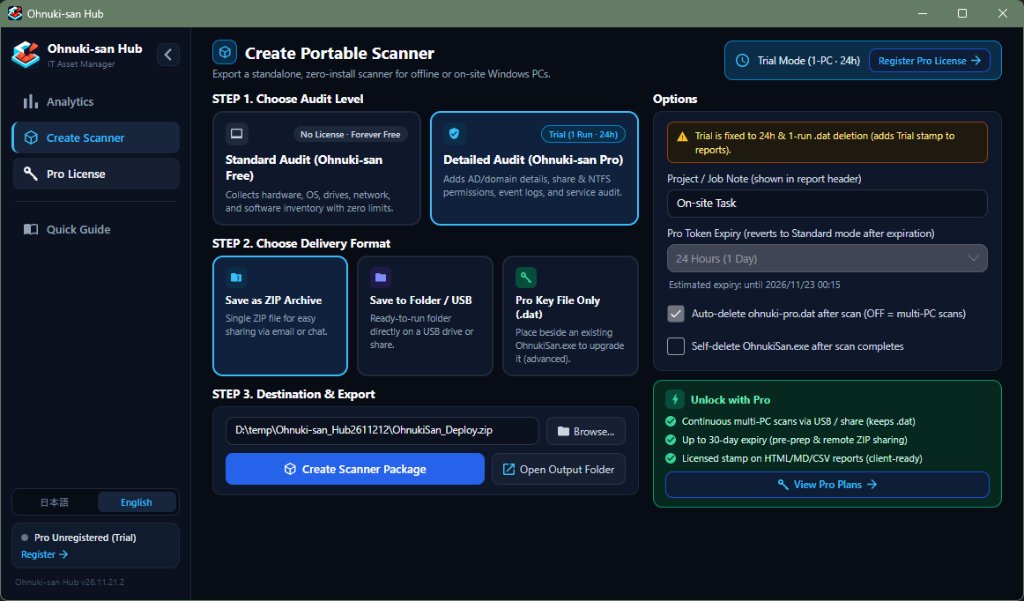
Export OhnukiSan.exe to a ZIP archive, USB folder, or standalone .dat in one click.

Fleet Analytics Dashboard

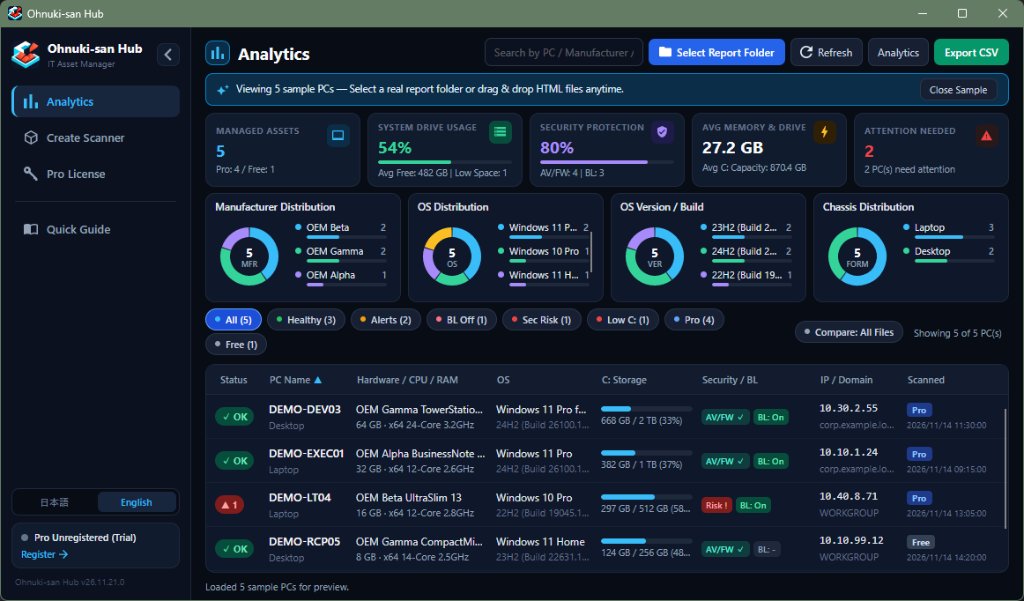
Drop HTML reports to view 5 KPI cards, 4 cross-filtering charts, and Compare/Ledger mode.

Unlimited Excel CSV Export

Export UTF-8 (with BOM) CSV ledgers ready for Excel with zero device or row limits.

100% Local & Offline-Safe

OhnukiSan.exe makes zero network requests, and inventory data never leaves your PC.

Main Use Cases

Company-wide PC audits & CSV ledgers
On-site PC kitting & pre-delivery checks
Fleet OS, storage & BitLocker monitoring
Offline deep audits (AD, logs, services, PnP)

Free vs. Pro

Hub Analytics, CSV export & Free scanner export are 100% free & unlimited. Unregistered users can export a 24h one-shot Pro Trial for single-PC evaluation, while activating a Pro License unlocks production deployment—continuous multi-PC scanning, clean licensed report headers for client delivery, and up to 30-day token expiry.

Feature Standard (Free) Detailed (Pro)
Hub Analytics Dashboard & Unlimited CSV Export
Core Inventory
Hardware, OS, Storage, Network, Security, Apps, Updates
Enterprise Deep Audit
Share & NTFS Permissions, VPN, Proxy, Routing, Event Logs, AD/Entra ID, Services, PnP
Continuous Multi-PC Pro Scanning
(USB drive or shared folder)
—
(Unlimited, no license)
Disable auto-delete for batch scans
*Unregistered trial auto-deletes .dat after 1 scan
Pro Token Expiry —
(No expiry)
Choose 1, 3, 7, 14, or 30 days
*Unregistered trial is fixed at 24 hours
Report Attribution
(HTML / MD / CSV)
Standard header Licensed header & project note
*Unregistered trial shows Trial (Unregistered)
Management PC Licensing Unlimited PCs 1 license per management PC
*Exported scanner (OhnukiSan.exe) works on multiple PCs
Price Free $7/mo. / $49/yr.
Lifetime Special Offer: $99 (Reg. $119)

Pro Trial (Unregistered) vs. Pro License — 3 Reasons to Upgrade

1. Client-Ready & Audit-Ready Licensed Attribution

Reports generated with the unregistered trial (HTML / MD / CSV) display a Trial (Unregistered) stamp. A Pro License replaces it with your registered license attribution & project label (e.g., Licensed to: ... | Project: ...), making every report ready to hand directly to clients or file as audit evidence.

2. Continuous Multi-PC Scanning from One USB or Network Share

Because the unregistered trial automatically deletes ohnuki-pro.dat after a single run, it cannot be reused across machines. A Pro License lets you turn off auto-deletion so you can scan any number of PCs back-to-back from one USB drive or shared folder (while keeping optional post-scan cleanup when needed).

3. Up to 30-Day Expiry for Advance Prep & Remote ZIP Distribution

Unregistered trials are locked to 24 hours, which easily expires if you prepare scanners the day before or email ZIP packages to remote staff. A Pro License lets you choose 1, 3, 7, 14, or 30 days—plenty of time for advance kitting prep and remote collection (safely reverting to Standard Free mode once expired).

Host license.dat uses machine-bound AES-256-GCM encryption with a 30-day offline grace period. Field ohnuki-pro.dat supports clock rollback protection and optional post-scan self-deletion.

Note: Pro Licensing, USB Drives & Multiple PCs

Each Pro license is intended for 1 management PC. To use Pro features on multiple management PCs, please purchase one license per PC.

Scanner (OhnukiSan.exe) Works on Multiple PCs: Carry the exported OhnukiSan.exe and ohnuki-pro.dat (not OhnukiHub.exe itself) on a USB drive or shared folder to scan multiple target PCs continuously (with auto-delete OFF).

*Because license.dat is encrypted and bound to the activated PC, place OhnukiHub.exe in a local folder on your management PC. Copying an activated Hub folder to another PC or launching OhnukiHub.exe from a USB drive on a different PC automatically deletes license.dat due to the machine mismatch and reverts Hub to Free mode—requiring re-activation (consuming a PC migration slot) even after returning to the original PC.

Updates & PC Migration: When updating Hub to a newer version, copy license.dat from your previous folder into the new folder (or overwrite in place) to keep your activation without consuming a slot. Extra activation slots are provided as a buffer for PC replacement or OS reinstallation (if you need help, feel free to contact support).

Download & Pro License

Analytics, CSV & Free are 100% free. Upgrade to Pro for continuous multi-PC scans, clean licensed reports, and up to 30-day expiry.
Screenshots

Click any image to enlarge (arrow keys supported).

Analytics Dashboard Screen
Click to Enlarge

Analytics Dashboard

5 KPI cards, 4 cross-filtering charts, and instant fleet health filtering.

Create Portable Scanner Screen
Click to Enlarge

Create Portable Scanner

Choose Free or Pro (Trial/Licensed), set options, and export as ZIP, Folder/USB, or .dat.

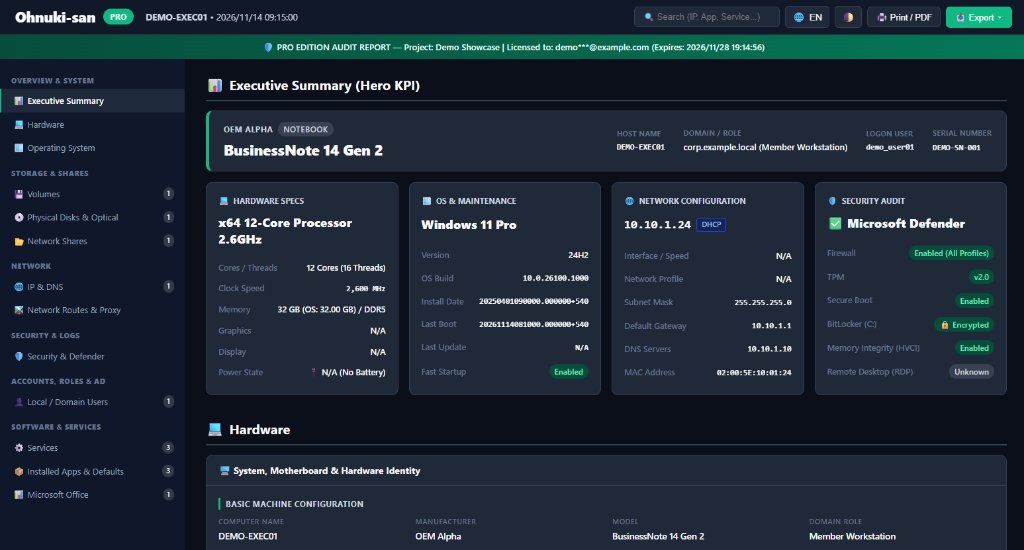
Generated Ohnuki-san HTML Report
Click to Enlarge

Self-Contained HTML Report

Searchable HTML reports with Print/PDF—licensed Pro adds clean attribution & project notes.

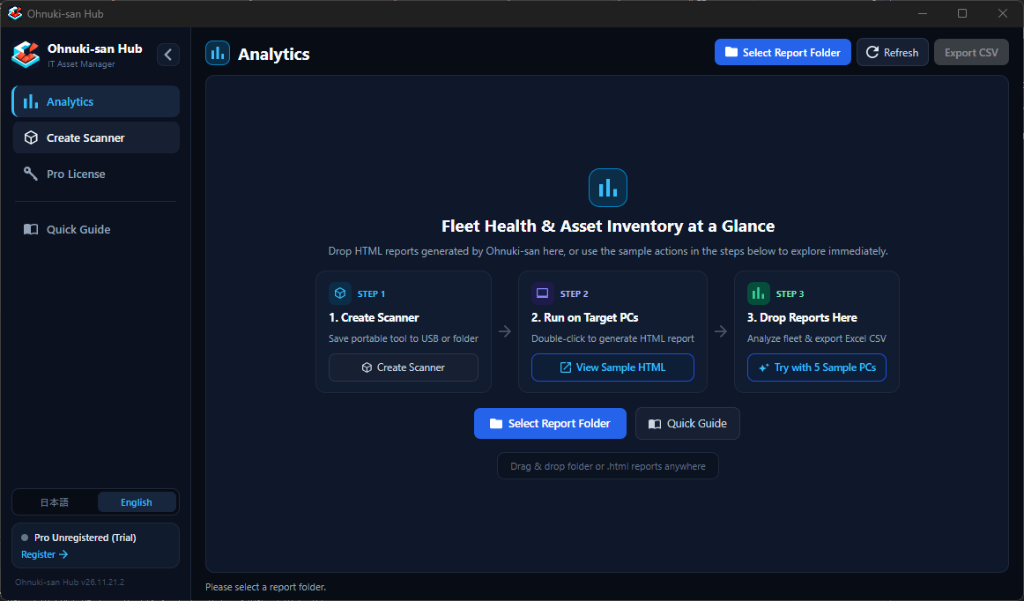
Analytics Start Screen
Click to Enlarge

Drag & Drop & Sample Demo

Drop folders anytime, or test right away via "View Sample HTML" & "Try with 5 Sample PCs".

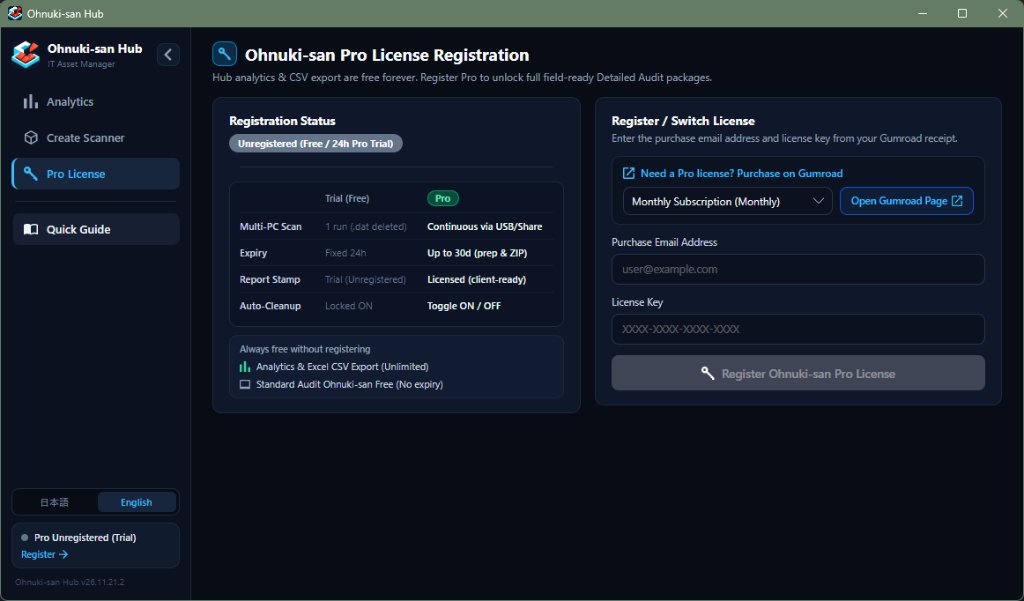
Pro License Registration Screen
Click to Enlarge

Pro License Registration

Shows Trial vs. Pro comparison, free features without registration, and Gumroad key activation.

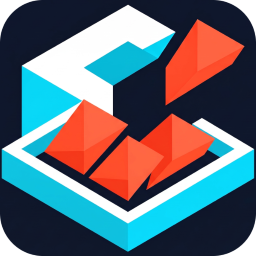
Getting Started Quick Guide Screen
Click to Enlarge

Quick Guide

Built-in 3-step guide, scanner mode comparison, and FAQ.

How It Works (3 Steps)

01

Create Scanner

Export OhnukiSan.exe to a USB drive or ZIP.

02

Run on Target PCs

Double-click to generate an offline HTML report.

03

Aggregate & Export

Drop HTML reports into Hub and export Excel CSV.

Click Try with 5 Sample PCs to explore the dashboard right away.

Frequently Asked Questions (FAQ)

A. No. When Lite (now Free), Plus (now Pro), and Dashboard were unified into Hub, the report format was updated. Please use HTML reports generated by the latest OhnukiSan.exe exported from Hub.

A. Yes. Analytics, charts, unlimited Excel-ready CSV export, and Standard (Free) scanner export are all 100% free with no device limits for personal and commercial use.

A. Yes. Without a license key, you can export a 24h-expiry, one-shot auto-delete Pro Trial to test every Pro audit item on a single PC. Activating a paid Pro License unlocks three key production benefits:
1) Replaces the Trial (Unregistered) stamp across HTML/MD/CSV reports with licensed attribution & project notes ready for client delivery and audit evidence
2) Lets you disable .dat auto-deletion for continuous multi-PC scanning from one USB drive or shared folder
3) Extends expiry from 24 hours to 1, 3, 7, 14, or 30 days so advance prep or remote ZIP distribution never expires mid-rollout

A. Each Pro License is intended for 1 management PC (to use Pro features on multiple management PCs, please purchase one license per PC).
However, the exported scanner (OhnukiSan.exe + ohnuki-pro.dat) can be carried on a USB drive or placed in a shared folder to scan multiple target PCs.
*Because license.dat is machine-bound, place OhnukiHub.exe in a local folder on your management PC. Copying an activated Hub folder to another PC or launching OhnukiHub.exe from a USB drive on a different PC automatically deletes license.dat and reverts Hub to Free mode, requiring re-activation (consuming a PC migration slot) even on the original PC. When updating to a newer version, copy license.dat from your previous folder into the new folder (or overwrite in place) to carry over your activation without consuming a slot.

A. Never. OhnukiSan.exe performs zero network communication, and Hub only contacts the Gumroad API for Pro license activation/verification (with a 30-day offline grace period).

A. Compiled with Native AOT—no .NET Runtime or registry edits required (delete the folder to uninstall). If SmartScreen appears on first launch, click "More info" → "Run anyway". Switch EN/JP UI anytime (or use --lang-en / --lang-ja).

Streamline Your Windows PC Inventory

Free & unlimited console. Download now or try the 5-PC sample demo.

Changelog

  • v26.11.22.0 2026.11.22
    Initial release of Ohnuki-san Hub (bundled OhnukiSan.exe v26.11.22.0)
    • Analytics Dashboard (5 KPIs, 4 donut charts, Compare/Ledger toggle, 5-PC sample demo, unlimited CSV export)
    • Create Scanner (ZIP, Folder/USB, .dat only, Free & 24h Pro Trial, customizable cleanup)
    • Gumroad Pro License management (Monthly / Yearly / Lifetime, AES-256-GCM, 30-day offline grace)
    • Quick Guide, EN/JP UI toggle (--lang-en / --lang-ja), and multi-locale support