
PinSharp ICO
Sharpening every detail down to 16×16. An ultra-crisp Windows icon builder.
Download on GitHub
*No installation required. Runs as a portable app.
Sharpening every detail down to 16×16. An ultra-crisp Windows icon builder.
*No installation required. Runs as a portable app.
PinSharp ICO is compiled with Native AOT technology, making it completely standalone and easy to carry on a USB flash drive.
It requires absolutely no additional runtimes like .NET. Simply extract the folder containing `PinSharpICO.exe` alongside its accompanying DLLs (`Magick.Native-Q8-x64.dll`, `libSkiaSharp.dll`, `libHarfBuzzSharp.dll`, and `av_libglesv2.dll`), and run it directly on any PC. It leaves zero registry footprints—uninstall anytime simply by deleting the folder.
"From 256px to 16px. Relentlessly engineered for micro-dot clarity."
Standard downscaling tools frequently introduce frustrating artifacts when generating icons: white outlines turn into muddy gray, tight dark slits vanish, and edges blur out into vague silhouettes at 16×16 or 24×24.
PinSharp ICO tackles this extreme compression process (a 1/256 area reduction) through a dedicated perceptual downscaling engine. It preserves sharp contrast for fine borders, typography, and narrow gaps, generating multi-resolution Windows `.ico` files that stand out crisply on taskbars, title bars, and notifications.
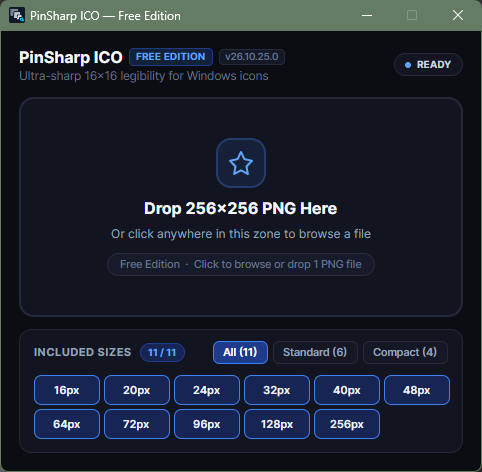
Clean, focused workspace—just drag and drop your PNG.
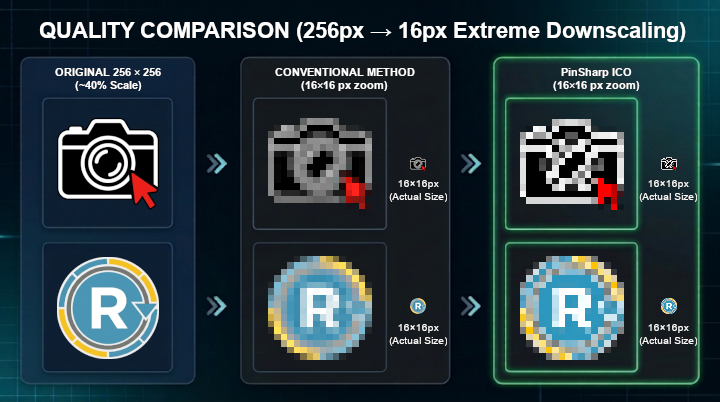
Preserves fine lines and slits that conventional algorithms blur away.
Open the extracted folder and double-click `PinSharpICO.exe` to start.
Drag and drop your 256×256 PNG file into the center drop area (or click to browse).
Conversion runs immediately, and the generated `.ico` is saved into the same folder automatically.
Freeware (Personal & Commercial)
Redistribution Prohibited
Use at your own risk (Disclaimer)
| OS | Windows 10 / 11 (64-bit x64) |
|---|---|
| Input | 256×256 PNG image |
| Sizes | 16–256px (All 11 sizes) |
| Runtime | None (Native AOT) |