
Simple Stats

Peace of mind in the corner of your desktop. A minimal monitor for resources and network.

Download on GitHub

*No installation required. Runs as a standalone app.
No additional runtimes needed

Simple Stats is designed to run as a single executable file.

It requires no .NET runtime installation and does not write to the Windows Registry. Just download and start checking your PC's health in a clean environment.

Product Overview

"All the essential info, in the smallest possible space."

Simple Stats is a real-time system monitor that displays PC resource status and network information in a compact window.

Featuring a high-visibility dark theme and "Always on Top" capability, it lets you keep an eye on your system without interrupting your workflow.

Key Features

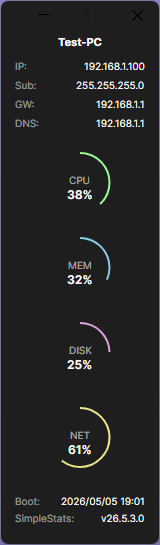
  • Real-time Monitoring: Visualizes CPU, Memory, Disk, and Network load with gauges.
  • Network Information: Displays Hostname, IP Address, Subnet, Gateway, and DNS.
  • Smart Design: Auto-saves window position and releases memory when minimized.
  • Alert System: Gauge colors change to notify you when load exceeds 80%.

Screenshots

Simple Stats Main Window

Main Dashboard

Instantly grasp current resource usage with charts and numbers.

How to Use

01

Launch & Place

Run the executable and drag it to your preferred location on the desktop.

02

Monitor Status

Check CPU/MEM/DISK/NET usage and network details in real-time.

03

Auto Restore

Window position is saved automatically and restored on next launch.

Changelog

  • v26.5.3.0 May 3, 2026
    Initial release of Simple Stats.

Download

Standard Edition

FREE

Get it on GitHub

Freeware (Personal & Commercial)

Redistribution Prohibited

No User Registration Required

System Requirements

OSWindows 10 / 11
Arch64-bit (x64)
RuntimeNone (Self-contained)
FormatSingle Executable
SettingsJSON File (No Registry)