
Ohnuki-san Lite

Check your PC's "current status" instantly. A simple, lightweight utility for everyone.

Download Latest (GitHub)

*Free for both individual and commercial use.
Product Description

"The information you need, when you need it, at maximum speed."

Ohnuki-san Lite is a free software specialized in displaying essential information for daily PC management, maintaining the same ease of use as the "Plus" edition.

No Installation Required

Runs from a single executable without touching the registry. It’s fully portable—just carry it on a USB drive.

Intuitive UI

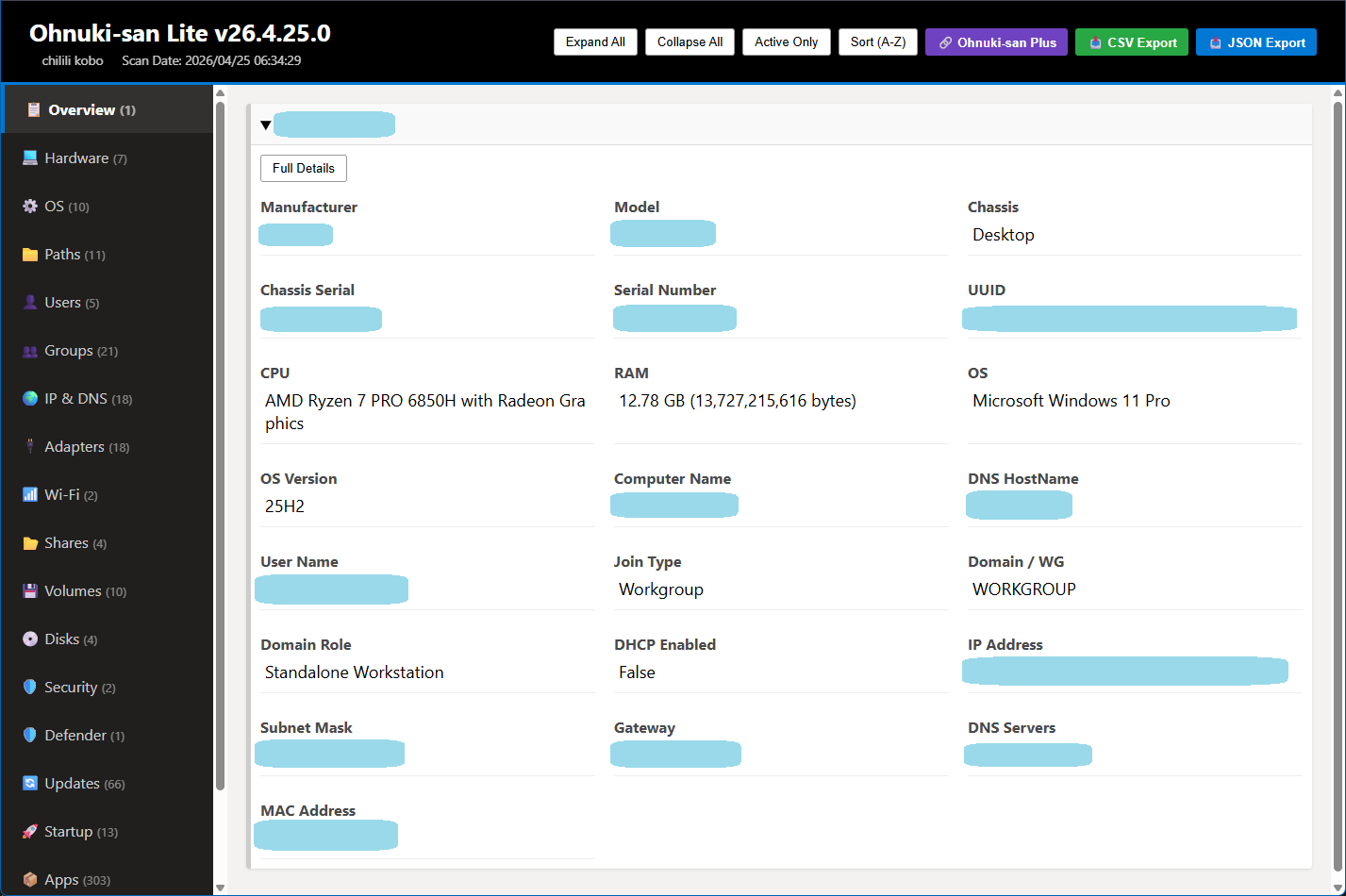
No complex setup required. View all specs and serial numbers on a single screen the moment you launch it.

Key Information Displayed

CPU / Memory
OS Version
BIOS Serial Number
IP / MAC Address
Storage Config
Model / Manufacturer

If you need more detailed reporting or asset management, please consider Ohnuki-san Plus.

Lite vs. Plus Comparison

Category / Feature Lite (Free) Plus (Pro)
[ Basic Diagnostics ]
Core System Specifications
(CPU, RAM, OS Build, etc.)
Software Inventory
(List of installed applications)
Windows Update History
HTML Report Generation
[ Network & Infrastructure ]
Basic IP Configuration
(IP Address, DNS, etc.)
Corporate Proxy Discovery
Routing Table Analysis
(Static Route extraction)
Active Directory Topology
[ Advanced Analysis & Server Management ]
Windows Services Inventory
(Running services & status)
PnP Device Inventory
(Full hardware peripherals list)
Server Roles & Features
(For Windows Server environments)
[ Terms of Use ]
Domain / Enterprise Deployment Personal & Workgroup Use Enterprise & Commercial Use
License Activation Not Required Required
Pricing Free From 500 JPY / month

Regarding Domain Environments

Ohnuki-san Lite is designed for personal use and small workgroup environments. Operation in domain environments (Active Directory, etc.) is not supported.

If you need to bulk collect and manage information for corporate IT asset management or PC kitting of domain-joined devices, please use the premium version, Ohnuki-san Plus.

Screenshots

Report Result

Browser-Based Report

A detailed report automatically opens in your default web browser.

How to Use

01

Extract & Launch

Unzip the files and run the executable.

02

Auto-Scan

Gathers all deep PC system info instantly upon startup.

03

View Report

A report is auto-generated and opens in your browser.

No complex steps. A seamless experience from execution to report viewing.

Changelog

  • v26.4.25.0 2026.04.25
    Added Windows Defender status retrieval. Minor bug fixes.
  • v26.4.23.0 2026.04.23
    Implemented offline mode detection.
    Added Entra ID (Domain) join status check.
  • v26.4.21.0 2026.04.21
    Initial release of Ohnuki-san Lite.

Download

Lite Edition

FREE

Get on GitHub

No registration required

No advertisements

Free for commercial and personal use

Requirements

OSWindows 10 / 11
Arch64-bit (x64)
RuntimeNot Required (Standalone)