
Ohnuki-san Dashboard

Transforming information from "Collection" to "Utilization." A visual analysis tool for IT asset management.

Download Latest (GitHub)

*Requires data generated by Ohnuki-san Plus
Ohnuki-san Lite or Plus is Required

Ohnuki-san Dashboard is a viewer designed to load and analyze data exported by Ohnuki-san Lite or Ohnuki-san Plus.

Since this tool does not collect system information on its own, please prepare a data folder (report set) generated by either of these tools beforehand.
*Ohnuki-san Lite is a streamlined version of the Plus edition with a limited set of collection items. For comprehensive data visualization, please refer to the comparison table and consider using Ohnuki-san Plus.

Product Description

"Turning massive reports into instant insights."

Ohnuki-san Dashboard was developed to integrate scattered system information into one place, providing a graphical overview of your IT asset status.

Looking for a data collection tool?

To create the HTML reports required for analysis, please use "Ohnuki-san Plus," our system information extraction tool.

View Ohnuki-san Plus Details

Screenshots

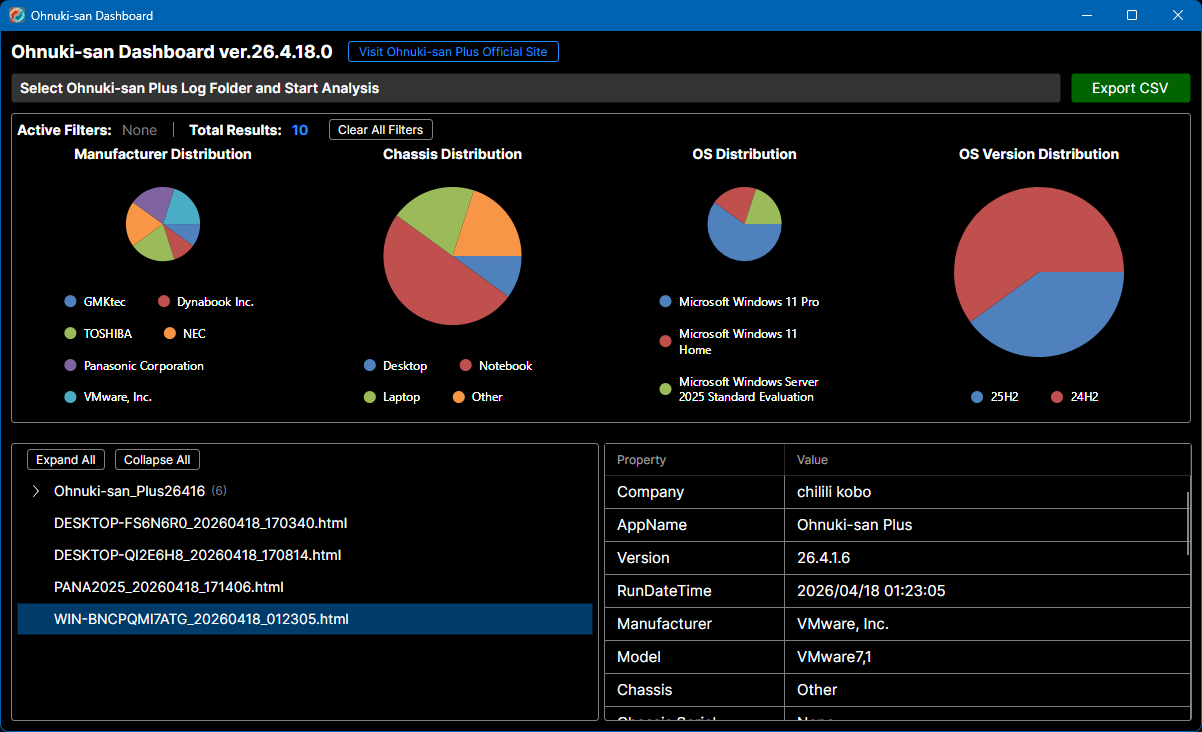
Integrated Dashboard

Main Dashboard

Visual status updates via intuitive graphs.

How to Use

01

Prepare Data

Run Ohnuki-san Plus to generate HTML reports of PC information.

02

Select Folder

Launch Dashboard and select the folder containing the reports.

03

Visual Analysis

Instantly grasp system configurations via auto-generated charts and trees.

Change Log

  • v26.4.18.0 2026.04.18
    Ohnuki-san Dashboard Released.

Download

Standard Edition

FREE

Get on GitHub

No registration required

No advertisements

Free for commercial and personal use

Requirements

OSWindows 10 / 11
Arch64-bit (x64)
RuntimeNot Required (Standalone)
Input DataLite / Plus Report Folder
PrerequisiteOhnuki-san Lite / Ohnuki-san Plus